Friday, December 5, 2025

OpenStack Epoxy : OpenStack Rally


OpenStack Epoxy : OpenStack Rally


Install OpenStack BenchiMarking Tool, Rally.

This example is based on the environment like follows.

------------+--------------------------+--------------------------+------------
            |                          |                          |
        eth0|10.0.0.30             eth0|10.0.0.50             eth0|10.0.0.51
+-----------+-----------+  +-----------+-----------+  +-----------+-----------+
|   [ dlp.srv.world ]   |  | [ network.srv.world ] |  |  [ node01.srv.world ] |
|     (Control Node)    |  |     (Network Node)    |  |     (Compute Node)    |
|                       |  |                       |  |                       |
|  MariaDB    RabbitMQ  |  |      Open vSwitch     |  |        Libvirt        |
|  Memcached  Nginx     |  |     Neutron Server    |  |      Nova Compute     |
|  Keystone   httpd     |  |      OVN-Northd       |  |      Open vSwitch     |
|  Glance     Nova API  |  |  Nginx  iSCSI Target  |  |   OVN Metadata Agent  |
|  Cinder API           |  |     Cinder Volume     |  |     OVN-Controller    |
|  Rally                |  |    Heat API/Engine    |  |                       |
+-----------------------+  +-----------------------+  +-----------------------+

[1]Create user and Database for Rally in MariaDB.
root@dlp ~(keystone)# 
mysql

Welcome to the MariaDB monitor.  Commands end with ; or \g.
Your MariaDB connection id is 310
Server version: 11.8.2-MariaDB-1 from Debian -- Please help get to 10k stars at https://github.com/MariaDB/Server

Copyright (c) 2000, 2018, Oracle, MariaDB Corporation Ab and others.

Type 'help;' or '\h' for help. Type '\c' to clear the current input statement.

MariaDB [(none)]> create database rally; 
Query OK, 1 row affected (0.00 sec)

MariaDB [(none)]> grant all privileges on rally.* to rally@'localhost' identified by 'password'; 
Query OK, 0 rows affected (0.00 sec)

MariaDB [(none)]> grant all privileges on rally.* to rally@'%' identified by 'password'; 
Query OK, 0 rows affected (0.00 sec)

MariaDB [(none)]> exit 
Bye
[2]Install Rally.
root@dlp ~(keystone)# 
apt -y install rally python3-rally-openstack python3-fixtures
[3]Configure Rally.
root@dlp ~(keystone)# 
vi /etc/rally/rally.conf
# line 33 : add log file name

log_file = rally.log
# line 38 : add log directory name

log_dir = /var/log/rally
[database]
# line 202 : change : MariaDB connection info

connection = 
mysql+pymysql://rally:password@dlp.srv.world/rally
root@dlp ~(keystone)# 
rally db create

Creating database: mysql+pymysql://rally:password@dlp.srv.world/rally
Database created successfully
[4]Add environment variables for Openstack to Rally to run Rally BenchiMarking Tasks.
root@dlp ~(keystone)# 
rally deployment create --fromenv --name=my-cloud

+--------------------------------------+---------------------+----------+------------------+--------+
| uuid                                 | created_at          | name     | status           | active |
+--------------------------------------+---------------------+----------+------------------+--------+
| aeebe9da-0683-4495-b503-766ad8910430 | 2025-09-04T01:03:58 | my-cloud | deploy->finished |        |
+--------------------------------------+---------------------+----------+------------------+--------+
Using deployment: aeebe9da-0683-4495-b503-766ad8910430
~/.rally/openrc was updated

HINTS:

* To use standard OpenStack clients, set up your env by running:
        source ~/.rally/openrc
  OpenStack clients are now configured, e.g run:
        openstack image list

root@dlp ~(keystone)# 
rally deployment show my-cloud

+-------------------------------+----------+----------+-------------+-------------+---------------+
| auth_url                      | username | password | tenant_name | region_name | endpoint_type |
+-------------------------------+----------+----------+-------------+-------------+---------------+
| https://dlp.srv.world:5000/v3 | admin    | ***      | admin       |             | None          |
+-------------------------------+----------+----------+-------------+-------------+---------------+

root@dlp ~(keystone)# 
rally deployment check

--------------------------------------------------------------------------------
Platform openstack:
--------------------------------------------------------------------------------

Available services:
+-------------+----------------+-----------+
| Service     | Service Type   | Status    |
+-------------+----------------+-----------+
| __unknown__ | placement      | Available |
| barbican    | key-manager    | Available |
| cinder      | volumev3       | Available |
| cloud       | cloudformation | Available |
| glance      | image          | Available |
| heat        | orchestration  | Available |
| keystone    | identity       | Available |
| neutron     | network        | Available |
| nova        | compute        | Available |
+-------------+----------------+-----------+
[5]How to use Rally.
For a sample scenario in following tutorial, there are many other samples on the site below, refer to them.
⇒ https://github.com/openstack/rally/blob/master/samples/tasks/scenarios/
root@dlp ~(keystone)# 
openstack image list

+--------------------------------------+--------------+--------+
| ID                                   | Name         | Status |
+--------------------------------------+--------------+--------+
| 33def798-3361-483b-9de1-8c2c6e1c840c | Debian13     | active |
| a43cc8d1-4212-4118-9a8a-2f73315a6b46 | Trove-Ubuntu | active |
+--------------------------------------+--------------+--------+

root@dlp ~(keystone)# 
openstack flavor list

+----+-----------+-------+------+-----------+-------+-----------+
| ID | Name      |   RAM | Disk | Ephemeral | VCPUs | Is Public |
+----+-----------+-------+------+-----------+-------+-----------+
| 1  | m1.tiny   |  2048 |   10 |         0 |     1 | True      |
| 2  | m1.small  |  4096 |   10 |         0 |     2 | True      |
| 3  | m1.medium |  8192 |   10 |         0 |     4 | True      |
| 4  | m1.large  | 16384 |   10 |         0 |     8 | True      |
| 5  | m2.medium |  8192 |   10 |        10 |     4 | True      |
+----+-----------+-------+------+-----------+-------+-----------+

# set Benchimarking scenario
# for example, set a simple scenario to create and delete a compute instance
# for [flavor], specify your own registered flavor name
# for [image], specify your own registered image name

root@dlp ~(keystone)# 
vi boot-and-delete.json
{
  "NovaServers.boot_and_delete_server": [
    {
      "args": {
        "flavor": {
          "name": "m1.tiny"
        },
        "image": {
          "name": "Debian13"
        },
        "force_delete": false
      },
      "runner": {
        "type": "constant",
        "times": 10,
        "concurrency": 2
      },
      "context": {}
    }
  ]
}

# start BenchiMarking Tasks

root@dlp ~(keystone)# 
rally task start boot-and-delete.json

.....
.....

--------------------------------------------------------------------------------
Task 1b664a81-2147-4a7d-93b9-396d7ce58458 has 0 error(s)
--------------------------------------------------------------------------------

+-----------------------------------------------------------------------------------------------------------------------+
|                                                 Response Times (sec)                                                  |
+--------------------+-----------+--------------+--------------+--------------+-----------+-----------+---------+-------+
| Action             | Min (sec) | Median (sec) | 90%ile (sec) | 95%ile (sec) | Max (sec) | Avg (sec) | Success | Count |
+--------------------+-----------+--------------+--------------+--------------+-----------+-----------+---------+-------+
| nova.boot_server   | 11.857    | 12.037       | 14.026       | 14.105       | 14.185    | 12.523    | 100.0%  | 10    |
| nova.delete_server | 6.217     | 6.258        | 6.414        | 6.445        | 6.477     | 6.284     | 100.0%  | 10    |
| total              | 18.113    | 18.352       | 20.245       | 20.332       | 20.418    | 18.807    | 100.0%  | 10    |
|  -> duration       | 17.113    | 17.352       | 19.245       | 19.332       | 19.418    | 17.807    | 100.0%  | 10    |
|  -> idle_duration  | 1.0       | 1.0          | 1.0          | 1.0          | 1.0       | 1.0       | 100.0%  | 10    |
+--------------------+-----------+--------------+--------------+--------------+-----------+-----------+---------+-------+

Load duration: 95.0776
Full duration: 103.242

HINTS:
* To plot HTML graphics with this data, run:
        rally task report 1b664a81-2147-4a7d-93b9-396d7ce58458 --out output.html

* To generate a JUnit report, run:
        rally task export 1b664a81-2147-4a7d-93b9-396d7ce58458 --type junit-xml --to output.xml

* To get raw JSON output of task results, run:
        rally task report 1b664a81-2147-4a7d-93b9-396d7ce58458 --json --out output.json
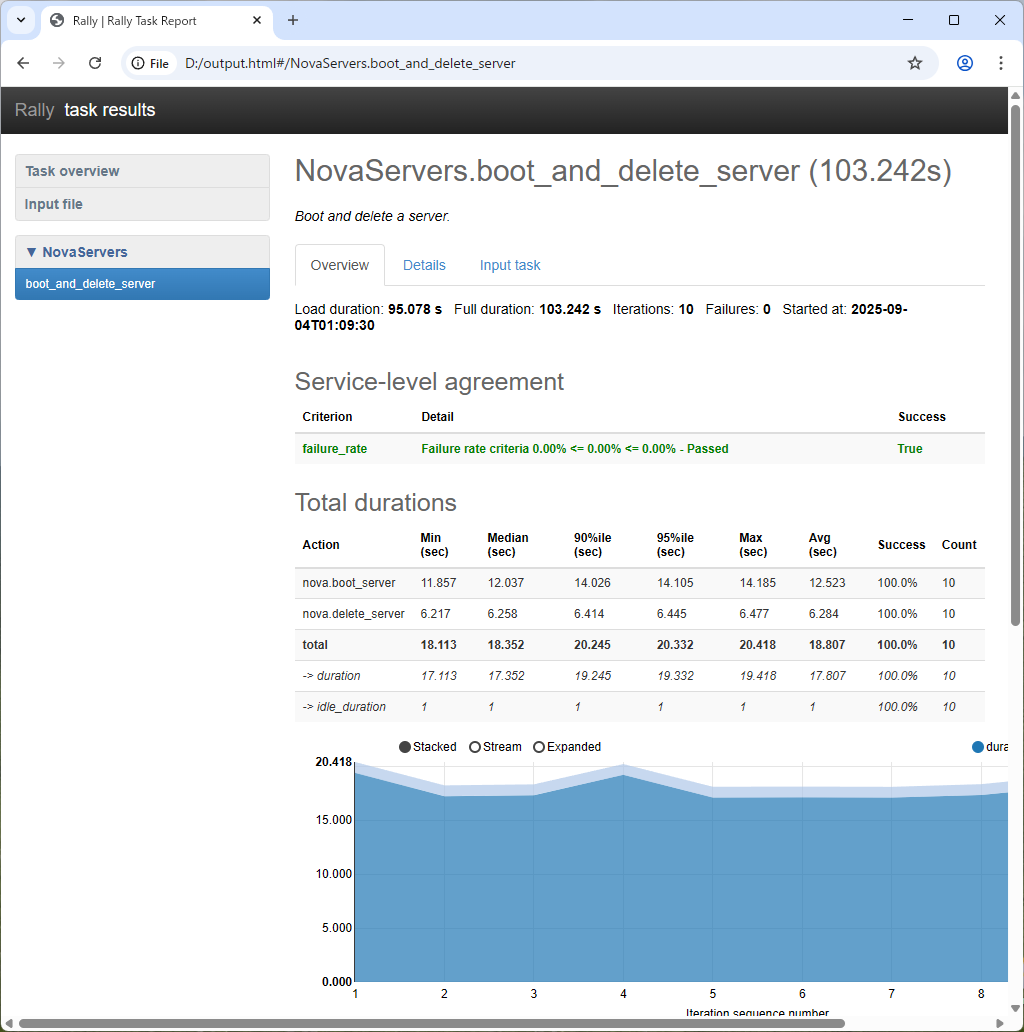
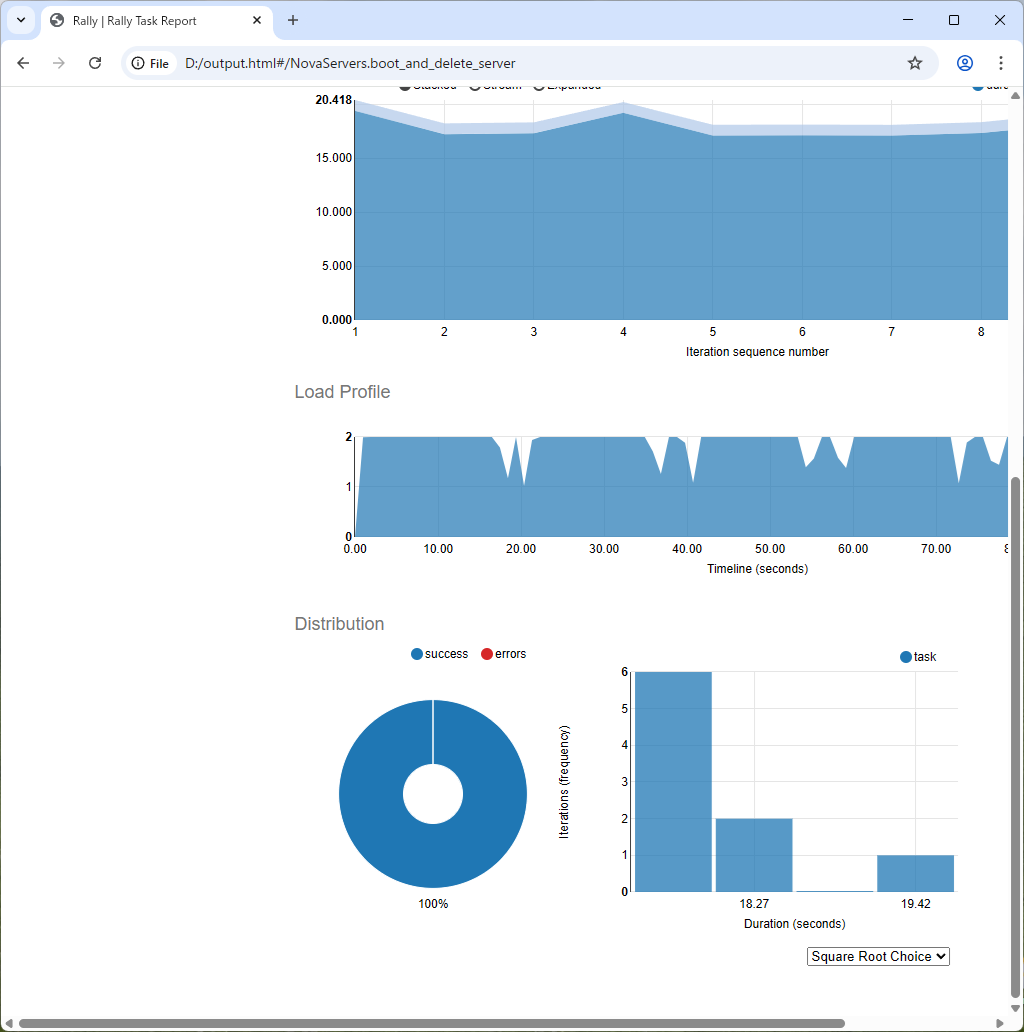
[6]To run the commands that were shown when task had completed, it's possible to generate HTML file with Graph like follows.
Matched Content

OpenStack Epoxy : How to use Trove


OpenStack Epoxy : How to use Trove


This is how to use Trove.

This example is based on the environment like follows.

------------+--------------------------+--------------------------+------------
            |                          |                          |
        eth0|10.0.0.30             eth0|10.0.0.50             eth0|10.0.0.51
+-----------+-----------+  +-----------+-----------+  +-----------+-----------+
|   [ dlp.srv.world ]   |  | [ network.srv.world ] |  |  [ node01.srv.world ] |
|     (Control Node)    |  |     (Network Node)    |  |     (Compute Node)    |
|                       |  |                       |  |                       |
|  MariaDB    RabbitMQ  |  |      Open vSwitch     |  |        Libvirt        |
|  Memcached  Nginx     |  |     Neutron Server    |  |      Nova Compute     |
|  Keystone   httpd     |  |      OVN-Northd       |  |      Open vSwitch     |
|  Glance     Nova API  |  |  Nginx  iSCSI Target  |  |   OVN Metadata Agent  |
|  Cinder API           |  |     Cinder Volume     |  |     OVN-Controller    |
|                       |  |     Trove Services    |  |                       |
+-----------------------+  +-----------------------+  +-----------------------+

[1]Download a VM image for Trove and add it to Glance.
Also Create a Cinder volume type configured in [trove.conf].
root@dlp ~(keystone)# 
wget https://tarballs.opendev.org/openstack/trove/images/trove-master-guest-ubuntu-jammy.qcow2

root@dlp ~(keystone)# 
openstack image create Trove-Ubuntu --file=trove-master-guest-ubuntu-jammy.qcow2 --disk-format=qcow2 --container-format=bare --tag=trove --private
root@dlp ~(keystone)# 
openstack image list

+--------------------------------------+--------------+--------+
| ID                                   | Name         | Status |
+--------------------------------------+--------------+--------+
| 33def798-3361-483b-9de1-8c2c6e1c840c | Debian13     | active |
| a43cc8d1-4212-4118-9a8a-2f73315a6b46 | Trove-Ubuntu | active |
+--------------------------------------+--------------+--------+

root@dlp ~(keystone)# 
openstack volume type create lvm-trove --private

+-------------+--------------------------------------+
| Field       | Value                                |
+-------------+--------------------------------------+
| description | None                                 |
| id          | 90c0e51e-3de4-4e12-9424-c45221e80eb6 |
| is_public   | False                                |
| name        | lvm-trove                            |
+-------------+--------------------------------------+
[2]Add Datastore you'd like to use on the Node Trove API is running. (it's Network Node on this example)
For example, add MariaDB, PostgreSQL on here.
# add datastore

root@network:~# 
su -s /bin/bash trove -c "trove-manage datastore_update mariadb ''"

Datastore 'mariadb' updated.
root@network:~# 
su -s /bin/bash trove -c "trove-manage datastore_update postgresql ''"

Datastore 'postgresql' updated.
# add versions for each datastore

# for [a43cc8d1-***], that's the image ID of Trove you created in [2]

root@network:~# 
su -s /bin/sh -c "trove-manage datastore_version_update mariadb 10.6 mariadb a43cc8d1-4212-4118-9a8a-2f73315a6b46 mariadb 1" trove

Datastore version '10.6(10.6)' updated.
root@network:~# 
su -s /bin/sh -c "trove-manage datastore_version_update postgresql 14 postgresql a43cc8d1-4212-4118-9a8a-2f73315a6b46 postgresql 1" trove

Datastore version '14(14)' updated.
# add parameters for each version of datastore

root@network:~# 
su -s /bin/bash trove -c "trove-manage db_load_datastore_config_parameters mariadb 10.6 /usr/lib/python3/dist-packages/trove/templates/mariadb/validation-rules.json"

Loading config parameters for datastore (mariadb) version (10.6)
root@network:~# 
su -s /bin/bash trove -c "trove-manage db_load_datastore_config_parameters postgresql 14 /usr/lib/python3/dist-packages/trove/templates/mariadb/validation-rules.json"

Loading config parameters for datastore (postgresql) version (14)
# create [cloudinit] files for VM image

root@network:~# 
mkdir /etc/trove/cloudinit

root@network:~# 
vi /etc/trove/cloudinit/mariadb.cloudinit
# create new
# specify Trove API host for [CONTROLLER]

#cloud-config
runcmd:
  - echo 'CONTROLLER=network.srv.world' > /etc/trove/controller.conf
  - chmod 644 /etc/trove/controller.conf

root@network:~# 
cp /etc/trove/cloudinit/mariadb.cloudinit /etc/trove/cloudinit/postgresql.cloudinit

root@network:~# 
chown -R trove /etc/trove/cloudinit

[3]Login as any Openstack user and create a Database instance on a Node.
By the way, Database instance runs as a Docker container inside a VM instance.
debian@dlp ~(keystone)$ 
openstack datastore list

+--------------------------------------+------------+
| ID                                   | Name       |
+--------------------------------------+------------+
| e2c34f15-25f8-407b-97d7-3e8c3199dda7 | mariadb    |
| 1e321833-e1a7-43ab-96d6-e5a5c5bb8cb8 | postgresql |
+--------------------------------------+------------+

debian@dlp ~(keystone)$ 
openstack datastore version list mariadb

+--------------------------------------+------+---------+
| ID                                   | Name | Version |
+--------------------------------------+------+---------+
| 4bb28f7e-ca21-46f8-a6e7-f9a1384a8f4d | 10.6 | 10.6    |
+--------------------------------------+------+---------+

debian@dlp ~(keystone)$ 
openstack flavor list

+----+-----------+-------+------+-----------+-------+-----------+
| ID | Name      |   RAM | Disk | Ephemeral | VCPUs | Is Public |
+----+-----------+-------+------+-----------+-------+-----------+
| 1  | m1.tiny   |  2048 |   10 |         0 |     1 | True      |
| 2  | m1.small  |  4096 |   10 |         0 |     2 | True      |
| 3  | m1.medium |  8192 |   10 |         0 |     4 | True      |
| 4  | m1.large  | 16384 |   10 |         0 |     8 | True      |
| 5  | m2.medium |  8192 |   10 |        10 |     4 | True      |
+----+-----------+-------+------+-----------+-------+-----------+

debian@dlp ~(keystone)$ 
openstack network list

+---------------------------------+---------+----------------------------------+
| ID                              | Name    | Subnets                          |
+---------------------------------+---------+----------------------------------+
| 7de3878f-814f-4909-b4e6-        | public  | 319013fd-5412-4cce-              |
| d4dc1c740577                    |         | bb87-49f5a0c91b0e                |
| d442015a-b6f6-4349-890b-        | private | bb5efd0a-ea4d-42ee-99ca-         |
| c08eb5366a4d                    |         | 97cee2f56ca2                     |
+---------------------------------+---------+----------------------------------+

# create database instance
debian@dlp ~(keystone)$ openstack database instance create MariaDB-106 \
--flavor 2 \
--size 10 \
--nic net-id=d442015a-b6f6-4349-890b-c08eb5366a4d \
--databases MyDB --users serverworld:password \
--datastore mariadb --datastore-version 10.6 \
--is-public \
--allowed-cidr 10.0.0.0/24 \
--allowed-cidr 192.168.100.0/24 
+--------------------------+--------------------------------------+
| Field                    | Value                                |
+--------------------------+--------------------------------------+
| allowed_cidrs            | ['10.0.0.0/24', '192.168.100.0/24']  |
| created                  | 2025-09-04T00:21:00                  |
| datastore                | mariadb                              |
| datastore_version        | 10.6                                 |
| datastore_version_number | 10.6                                 |
| flavor                   | 2                                    |
| id                       | 97b16c31-e13c-471c-96fa-ccadad32f29e |
| name                     | MariaDB-106                          |
| operating_status         |                                      |
| public                   | True                                 |
| region                   | RegionOne                            |
| service_status_updated   | 2025-09-04T00:21:00                  |
| status                   | BUILD                                |
| updated                  | 2025-09-04T00:21:00                  |
| volume                   | 10                                   |
+--------------------------+--------------------------------------+

# [BUILD] status during creation

debian@dlp ~(keystone)$ 
openstack database instance list

+----------+----------+-----------+-------------------+--------+------------------+--------+-----------+-----------+------+------+
| ID       | Name     | Datastore | Datastore Version | Status | Operating Status | Public | Addresses | Flavor ID | Size | Role |
+----------+----------+-----------+-------------------+--------+------------------+--------+-----------+-----------+------+------+
| 97b16c31 | MariaDB- | mariadb   | 10.6              | BUILD  |                  | True   |           | 2         |   10 |      |
| -e13c-   | 106      |           |                   |        |                  |        |           |           |      |      |
| 471c-    |          |           |                   |        |                  |        |           |           |      |      |
| 96fa-cca |          |           |                   |        |                  |        |           |           |      |      |
| dad32f29 |          |           |                   |        |                  |        |           |           |      |      |
| e        |          |           |                   |        |                  |        |           |           |      |      |
+----------+----------+-----------+-------------------+--------+------------------+--------+-----------+-----------+------+------+

# if successfully created, status turns to [HEALTHY]

debian@dlp ~(keystone)$ 
openstack database instance list

+----------+----------+-----------+-------------------+--------+------------------+--------+-----------+-----------+------+------+
| ID       | Name     | Datastore | Datastore Version | Status | Operating Status | Public | Addresses | Flavor ID | Size | Role |
+----------+----------+-----------+-------------------+--------+------------------+--------+-----------+-----------+------+------+
| 97b16c31 | MariaDB- | mariadb   | 10.6              | ACTIVE | HEALTHY          | True   | [{'addres | 2         |   10 |      |
| -e13c-   | 106      |           |                   |        |                  |        | s': '192. |           |      |      |
| 471c-    |          |           |                   |        |                  |        | 168.100.1 |           |      |      |
| 96fa-cca |          |           |                   |        |                  |        | 24',      |           |      |      |
| dad32f29 |          |           |                   |        |                  |        | 'type': ' |           |      |      |
| e        |          |           |                   |        |                  |        | private', |           |      |      |
|          |          |           |                   |        |                  |        | 'network' |           |      |      |
|          |          |           |                   |        |                  |        | : 'd44201 |           |      |      |
|          |          |           |                   |        |                  |        | 5a-b6f6-  |           |      |      |
|          |          |           |                   |        |                  |        | 4349-     |           |      |      |
|          |          |           |                   |        |                  |        | 890b-     |           |      |      |
|          |          |           |                   |        |                  |        | c08eb5366 |           |      |      |
|          |          |           |                   |        |                  |        | a4d'}, {' |           |      |      |
|          |          |           |                   |        |                  |        | address': |           |      |      |
|          |          |           |                   |        |                  |        | '10.0.0.2 |           |      |      |
|          |          |           |                   |        |                  |        | 12',      |           |      |      |
|          |          |           |                   |        |                  |        | 'type': ' |           |      |      |
|          |          |           |                   |        |                  |        | public'}] |           |      |      |
+----------+----------+-----------+-------------------+--------+------------------+--------+-----------+-----------+------+------+

# verify accesses

debian@dlp ~(keystone)$ 
mysql --skip-ssl -h 10.0.0.212 -u serverworld -p -e "show variables like 'hostname'; show databases;"

Enter password:
+---------------+--------------+
| Variable_name | Value        |
+---------------+--------------+
| hostname      | 5c02e921654e |
+---------------+--------------+
+--------------------+
| Database           |
+--------------------+
| MyDB               |
| information_schema |
+--------------------+

# to delete a database instance, do like follows

debian@dlp ~(keystone)$ 
openstack database instance delete MariaDB-106

Request to delete database instance f8deb123-10a6-4568-a291-31fed089d349 has been accepted.
[4]This is for the case to create PostgreSQL instance.
debian@dlp ~(keystone)$ 
openstack datastore list

+--------------------------------------+------------+
| ID                                   | Name       |
+--------------------------------------+------------+
| e2c34f15-25f8-407b-97d7-3e8c3199dda7 | mariadb    |
| 1e321833-e1a7-43ab-96d6-e5a5c5bb8cb8 | postgresql |
+--------------------------------------+------------+

debian@dlp ~(keystone)$ 
openstack datastore version list postgresql

+--------------------------------------+------+---------+
| ID                                   | Name | Version |
+--------------------------------------+------+---------+
| bf8386e3-c58e-4ebb-a861-2fec78911321 | 14   | 14      |
+--------------------------------------+------+---------+

debian@dlp ~(keystone)$ openstack database instance create PostgreSQL-14 \
--flavor 2 \
--size 10 \
--nic net-id=d442015a-b6f6-4349-890b-c08eb5366a4d \
--databases MyDB --users serverworld:password \
--datastore postgresql --datastore-version 14 \
--datastore-version-number 14 --is-public \
--is-public \
--allowed-cidr 10.0.0.0/24 \
--allowed-cidr 192.168.100.0/24 

debian@dlp ~(keystone)$ 
openstack database instance list

+----------+----------+-----------+-------------------+--------+------------------+--------+-----------+-----------+------+------+
| ID       | Name     | Datastore | Datastore Version | Status | Operating Status | Public | Addresses | Flavor ID | Size | Role |
+----------+----------+-----------+-------------------+--------+------------------+--------+-----------+-----------+------+------+
| 64ed1524 | PostgreS | postgresq | 14                | ACTIVE | HEALTHY          | True   | [{'addres | 2         |   10 |      |
| -26cc-   | QL-14    | l         |                   |        |                  |        | s': '192. |           |      |      |
| 41a1-    |          |           |                   |        |                  |        | 168.100.2 |           |      |      |
| 8b54-    |          |           |                   |        |                  |        | 34',      |           |      |      |
| 63f2d2f2 |          |           |                   |        |                  |        | 'type': ' |           |      |      |
| 2377     |          |           |                   |        |                  |        | private', |           |      |      |
|          |          |           |                   |        |                  |        | 'network' |           |      |      |
|          |          |           |                   |        |                  |        | : 'd44201 |           |      |      |
|          |          |           |                   |        |                  |        | 5a-b6f6-  |           |      |      |
|          |          |           |                   |        |                  |        | 4349-     |           |      |      |
|          |          |           |                   |        |                  |        | 890b-     |           |      |      |
|          |          |           |                   |        |                  |        | c08eb5366 |           |      |      |
|          |          |           |                   |        |                  |        | a4d'}, {' |           |      |      |
|          |          |           |                   |        |                  |        | address': |           |      |      |
|          |          |           |                   |        |                  |        | '10.0.0.2 |           |      |      |
|          |          |           |                   |        |                  |        | 33',      |           |      |      |
|          |          |           |                   |        |                  |        | 'type': ' |           |      |      |
|          |          |           |                   |        |                  |        | public'}] |           |      |      |
+----------+----------+-----------+-------------------+--------+------------------+--------+-----------+-----------+------+------+

debian@dlp ~(keystone)$ 
psql -h 10.0.0.233 -d MyDB -U serverworld -c "SELECT version();"

Password for user serverworld:
                                                       version
----------------------------------------------------------------------------------------------------------------------
 PostgreSQL 14.19 (Debian 14.19-1.pgdg13+1) on x86_64-pc-linux-gnu, compiled by gcc (Debian 14.2.0-19) 14.2.0, 64-bit
(1 row)
Matched Content

OpenStack Epoxy : Configure Trove (Network Node)


OpenStack Epoxy : Configure Trove (Network Node)


Install OpenStack Database Service (Trove).

This example is based on the environment like follows.
Install Trove services on Network Node.

------------+--------------------------+--------------------------+------------
            |                          |                          |
        eth0|10.0.0.30             eth0|10.0.0.50             eth0|10.0.0.51
+-----------+-----------+  +-----------+-----------+  +-----------+-----------+
|   [ dlp.srv.world ]   |  | [ network.srv.world ] |  |  [ node01.srv.world ] |
|     (Control Node)    |  |     (Network Node)    |  |     (Compute Node)    |
|                       |  |                       |  |                       |
|  MariaDB    RabbitMQ  |  |      Open vSwitch     |  |        Libvirt        |
|  Memcached  Nginx     |  |     Neutron Server    |  |      Nova Compute     |
|  Keystone   httpd     |  |      OVN-Northd       |  |      Open vSwitch     |
|  Glance     Nova API  |  |  Nginx  iSCSI Target  |  |   OVN Metadata Agent  |
|  Cinder API           |  |     Cinder Volume     |  |     OVN-Controller    |
|                       |  |     Trove Services    |  |                       |
+-----------------------+  +-----------------------+  +-----------------------+

[1]Install Trove services on Network Node.
root@network:~# 
apt -y install trove-api trove-conductor trove-taskmanager python3-troveclient
[2]Configure Trove.
root@network:~# 
mv /etc/trove/trove.conf /etc/trove/trove.conf.org

root@network:~# 
vi /etc/trove/trove.conf
# create new

[DEFAULT]
bind_host = 127.0.0.1
bind_port = 8779
log_dir = /var/log/trove
# RabbitMQ connection info
transport_url = rabbit://openstack:password@dlp.srv.world
control_exchange = trove
default_datastore = mysql
cinder_volume_type = lvm-trove
cloudinit_location = /etc/trove/cloudinit

# MariaDB connection info
[database]
connection = mysql+pymysql://trove:password@dlp.srv.world/trove

[mariadb]
tcp_ports = 3306,4444,4567,4568

[mysql]
tcp_ports = 3306

[postgresql]
tcp_ports = 5432

[redis]
tcp_ports = 6379,16379

# Keystone auth info
[keystone_authtoken]
www_authenticate_uri = https://dlp.srv.world:5000
auth_url = https://dlp.srv.world:5000
memcached_servers = dlp.srv.world:11211
auth_type = password
project_domain_name = Default
user_domain_name = Default
project_name = service
username = trove
password = servicepassword

[service_credentials]
auth_url = https://dlp.srv.world:5000
region_name = RegionOne
project_domain_name = Default
user_domain_name = Default
project_name = service
username = trove
password = servicepassword

root@network:~# 
vi /etc/trove/trove-guestagent.conf
# create new

[DEFAULT]
log_dir = /var/log/trove
log_file = trove-guestagent.log
ignore_users = os_admin
control_exchange = trove
transport_url = rabbit://openstack:password@dlp.srv.world
use_syslog = False

[service_credentials]
auth_url = https://dlp.srv.world:5000
region_name = RegionOne
project_domain_name = Default
user_domain_name = Default
project_name = service
username = trove
password = servicepassword

root@network:~# 
chmod 640 /etc/trove/{trove.conf,trove-guestagent.conf}

root@network:~# 
chgrp trove /etc/trove/{trove.conf,trove-guestagent.conf}

[3]Configure Nginx for proxy settings.
root@network:~# 
vi /etc/nginx/nginx.conf
# add into the [stream] section

stream {
    upstream neutron-api {
        server 127.0.0.1:9696;
    }
    server {
        listen 10.0.0.50:9696 ssl;
        proxy_pass neutron-api;
    }
    upstream trove-api {
        server 127.0.0.1:8779;
    }
    server {
        listen 10.0.0.50:8779 ssl;
        proxy_pass trove-api;
    }
    ssl_certificate "/etc/letsencrypt/live/network.srv.world/fullchain.pem";
    ssl_certificate_key "/etc/letsencrypt/live/network.srv.world/privkey.pem";
}
[4]Add Data into Database and start Trove services.
root@network:~# 
su -s /bin/bash trove -c "trove-manage db_sync"

root@network:~# 
systemctl restart trove-api trove-taskmanager trove-conductor

root@network:~# 
systemctl enable trove-api trove-taskmanager trove-conductor

root@network:~# 
systemctl restart nginx
[5]Verify Trove status on Control Node. That's OK if no error is shown.
root@dlp ~(keystone)# 
apt -y install python3-troveclient
root@dlp ~(keystone)# 
trove list
+----+------+-----------+-------------------+--------+-----------+------+--------+
| ID | Name | Datastore | Datastore Version | Status | Flavor ID | Size | Region |
+----+------+-----------+-------------------+--------+-----------+------+--------+
+----+------+-----------+-------------------+--------+-----------+------+--------+
Matched Content

OpenStack Epoxy : Configure Trove (Control Node)


OpenStack Epoxy : Configure Trove (Control Node)


Install OpenStack Database Service (Trove).

This example is based on the environment like follows.
Install Trove services on Network Node.

------------+--------------------------+--------------------------+------------
            |                          |                          |
        eth0|10.0.0.30             eth0|10.0.0.50             eth0|10.0.0.51
+-----------+-----------+  +-----------+-----------+  +-----------+-----------+
|   [ dlp.srv.world ]   |  | [ network.srv.world ] |  |  [ node01.srv.world ] |
|     (Control Node)    |  |     (Network Node)    |  |     (Compute Node)    |
|                       |  |                       |  |                       |
|  MariaDB    RabbitMQ  |  |      Open vSwitch     |  |        Libvirt        |
|  Memcached  Nginx     |  |     Neutron Server    |  |      Nova Compute     |
|  Keystone   httpd     |  |      OVN-Northd       |  |      Open vSwitch     |
|  Glance     Nova API  |  |  Nginx  iSCSI Target  |  |   OVN Metadata Agent  |
|  Cinder API           |  |     Cinder Volume     |  |     OVN-Controller    |
|                       |  |     Trove Services    |  |                       |
+-----------------------+  +-----------------------+  +-----------------------+

[1]Add users and others for Trove in Keystone.
# create [trove] user in [service] project

root@dlp ~(keystone)# 
openstack user create --domain default --project service --password servicepassword trove

+---------------------+----------------------------------+
| Field               | Value                            |
+---------------------+----------------------------------+
| default_project_id  | a60814a6c56241edbbdfae6c290f8abc |
| domain_id           | default                          |
| email               | None                             |
| enabled             | True                             |
| id                  | 8b68aa345a864004a55b4532d5bfc864 |
| name                | trove                            |
| description         | None                             |
| password_expires_at | None                             |
+---------------------+----------------------------------+

# add [trove] user in [admin] role

root@dlp ~(keystone)# 
openstack role add --project service --user trove admin
# create service entry for [trove]

root@dlp ~(keystone)# 
openstack service create --name trove --description "OpenStack Database Service" database

+-------------+----------------------------------+
| Field       | Value                            |
+-------------+----------------------------------+
| id          | 716e0718320d47d2868894040c1aa59f |
| name        | trove                            |
| type        | database                         |
| enabled     | True                             |
| description | OpenStack Database Service       |
+-------------+----------------------------------+

# define Trove API Host

root@dlp ~(keystone)# 
export trove_api=network.srv.world
# create endpoint for [trove] (public)

root@dlp ~(keystone)# 
openstack endpoint create --region RegionOne database public https://$trove_api:8779/v1.0/%\(tenant_id\)s

+--------------+---------------------------------------------------+
| Field        | Value                                             |
+--------------+---------------------------------------------------+
| enabled      | True                                              |
| id           | e2d3749a806b40eab2ae15d2497dfe09                  |
| interface    | public                                            |
| region       | RegionOne                                         |
| region_id    | RegionOne                                         |
| service_id   | 716e0718320d47d2868894040c1aa59f                  |
| service_name | trove                                             |
| service_type | database                                          |
| url          | https://network.srv.world:8779/v1.0/%(tenant_id)s |
+--------------+---------------------------------------------------+

# create endpoint for [trove] (internal)

root@dlp ~(keystone)# 
openstack endpoint create --region RegionOne database internal https://$trove_api:8779/v1.0/%\(tenant_id\)s

+--------------+---------------------------------------------------+
| Field        | Value                                             |
+--------------+---------------------------------------------------+
| enabled      | True                                              |
| id           | 9830f4ea6d28443ab602c759a418a860                  |
| interface    | internal                                          |
| region       | RegionOne                                         |
| region_id    | RegionOne                                         |
| service_id   | 716e0718320d47d2868894040c1aa59f                  |
| service_name | trove                                             |
| service_type | database                                          |
| url          | https://network.srv.world:8779/v1.0/%(tenant_id)s |
+--------------+---------------------------------------------------+

# create endpoint for [trove] (admin)

root@dlp ~(keystone)# 
openstack endpoint create --region RegionOne database admin https://$trove_api:8779/v1.0/%\(tenant_id\)s

+--------------+---------------------------------------------------+
| Field        | Value                                             |
+--------------+---------------------------------------------------+
| enabled      | True                                              |
| id           | 03b3c548b845490c957c1ac5f20f9867                  |
| interface    | admin                                             |
| region       | RegionOne                                         |
| region_id    | RegionOne                                         |
| service_id   | 716e0718320d47d2868894040c1aa59f                  |
| service_name | trove                                             |
| service_type | database                                          |
| url          | https://network.srv.world:8779/v1.0/%(tenant_id)s |
+--------------+---------------------------------------------------+
[2]Add a User and Database on MariaDB for Trove.
root@dlp ~(keystone)# 
mysql

Welcome to the MariaDB monitor.  Commands end with ; or \g.
Your MariaDB connection id is 237
Server version: 11.8.2-MariaDB-1 from Debian -- Please help get to 10k stars at https://github.com/MariaDB/Server

Copyright (c) 2000, 2018, Oracle, MariaDB Corporation Ab and others.

Type 'help;' or '\h' for help. Type '\c' to clear the current input statement.

MariaDB [(none)]> create database trove; 
Query OK, 1 row affected (0.00 sec)

MariaDB [(none)]> grant all privileges on trove.* to trove@'localhost' identified by 'password'; 
Query OK, 0 rows affected (0.00 sec)

MariaDB [(none)]> grant all privileges on trove.* to trove@'%' identified by 'password'; 
Query OK, 0 rows affected (0.00 sec)

MariaDB [(none)]> exit 
Bye
Matched Content

OpenStack Epoxy : How to use Aodh


OpenStack Epoxy : How to use Aodh


This is how to use OpenStack Alarming Service (Aodh).

This example is based on the emvironment like follows.

------------+--------------------------+--------------------------+------------
            |                          |                          |
        eth0|10.0.0.30             eth0|10.0.0.50             eth0|10.0.0.51
+-----------+-----------+  +-----------+-----------+  +-----------+-----------+
|   [ dlp.srv.world ]   |  | [ network.srv.world ] |  |  [ node01.srv.world ] |
|     (Control Node)    |  |     (Network Node)    |  |     (Compute Node)    |
|                       |  |                       |  |                       |
|  MariaDB    RabbitMQ  |  |      Open vSwitch     |  |        Libvirt        |
|  Memcached  Nginx     |  |     Neutron Server    |  |      Nova Compute     |
|  Keystone   httpd     |  |      OVN-Northd       |  |      Open vSwitch     |
|  Glance     Nova API  |  |  Nginx  iSCSI Target  |  |   OVN Metadata Agent  |
|  Cinder API           |  |     Cinder Volume     |  |     OVN-Controller    |
|                       |  |     Gnocchi httpd     |  |   Ceilometer Compute  |
|                       |  |   Ceilometer Central  |  |                       |
|                       |  |     Aodh Services     |  |                       |
+-----------------------+  +-----------------------+  +-----------------------+

[1]Login as a user you'd like to set Alarm for your own Instances.
For example, create an Alarm which alarms the cpu_util of an instance is over 70%.
debian@dlp ~(keystone)$ 
openstack server list

+----------------+-----------+---------+-----------------+----------+----------+
| ID             | Name      | Status  | Networks        | Image    | Flavor   |
+----------------+-----------+---------+-----------------+----------+----------+
| 2deabceb-e220- | Debian-13 | SHUTOFF | private=10.0.0. | Debian13 | m1.small |
| 4e5c-b8dd-     |           |         | 249,            |          |          |
| 320683d0bf0b   |           |         | 192.168.100.39  |          |          |
+----------------+-----------+---------+-----------------+----------+----------+

# for example, set an alarm to occur when the instance's CPU metric exceeds [100000000000.0 ns]

debian@dlp ~(keystone)$ 
INSTANS_ID=$(openstack server list | grep Debian-13 | awk '{print $2}')

debian@dlp ~(keystone)$ openstack alarm create \
--name cpu_hi \
--type gnocchi_resources_threshold \
--description 'CPU High' \
--metric cpu \
--threshold 100000000000.0 \
--comparison-operator gt \
--aggregation-method mean \
--granularity 300 \
--evaluation-periods 1 \
--resource-type instance \
--resource-id $INSTANS_ID 
+---------------------------+--------------------------------------+
| Field                     | Value                                |
+---------------------------+--------------------------------------+
| alarm_id                  | 8910b119-c5be-4518-a0ed-7ac940ad6c7e |
| name                      | cpu_hi                               |
| description               | CPU High                             |
| enabled                   | True                                 |
| ok_actions                | []                                   |
| alarm_actions             | []                                   |
| insufficient_data_actions | []                                   |
| repeat_actions            | False                                |
| type                      | gnocchi_resources_threshold          |
| time_constraints          | []                                   |
| project_id                | ecfa98ba82de421e8f16c3d862b5ab04     |
| user_id                   | da64c3c335434563b66eb2e8af260392     |
| timestamp                 | 2025-09-03T05:18:39.594441           |
| state                     | insufficient data                    |
| state_timestamp           | 2025-09-03T05:18:39.594441           |
| state_reason              | Not evaluated yet                    |
| severity                  | low                                  |
| evaluate_timestamp        | 2025-09-03T05:18:39.603964           |
| metric                    | cpu                                  |
| resource_id               | 2deabceb-e220-4e5c-b8dd-320683d0bf0b |
| resource_type             | instance                             |
| comparison_operator       | gt                                   |
| threshold                 | 100000000000.0                       |
| aggregation_method        | mean                                 |
| evaluation_periods        | 1                                    |
| granularity               | 300                                  |
+---------------------------+--------------------------------------+

# after creating, [state] is [insufficient data] because meters are not evaluated yet

debian@dlp ~(keystone)$ 
openstack alarm list

+---------------+---------------+--------+----------------+----------+---------+
| alarm_id      | type          | name   | state          | severity | enabled |
+---------------+---------------+--------+----------------+----------+---------+
| 8910b119-     | gnocchi_resou | cpu_hi | insufficient   | low      | True    |
| c5be-4518-    | rces_threshol |        | data           |          |         |
| a0ed-         | d             |        |                |          |         |
| 7ac940ad6c7e  |               |        |                |          |         |
+---------------+---------------+--------+----------------+----------+---------+

# data of the target instance is evaluated and if it does not exceed the threshold, the state is [ok]

debian@dlp ~(keystone)$ 
openstack alarm list

+-------------------+--------------------+--------+-------+----------+---------+
| alarm_id          | type               | name   | state | severity | enabled |
+-------------------+--------------------+--------+-------+----------+---------+
| 8910b119-c5be-    | gnocchi_resources_ | cpu_hi | ok    | low      | True    |
| 4518-a0ed-        | threshold          |        |       |          |         |
| 7ac940ad6c7e      |                    |        |       |          |         |
+-------------------+--------------------+--------+-------+----------+---------+

debian@dlp ~(keystone)$ 
openstack metric measures show $(openstack metric resource show $(openstack metric resource list | awk '{print $2,$4}' | grep -w 'instance' | awk '{print $1}') | grep 'cpu:' | awk '{print $5}')

+---------------------------+-------------+----------------+
| timestamp                 | granularity |          value |
+---------------------------+-------------+----------------+
| 2025-09-03T12:30:00+09:00 |       300.0 |  28660000000.0 |
| 2025-09-03T12:35:00+09:00 |       300.0 |  29640000000.0 |
| 2025-09-03T14:20:00+09:00 |       300.0 |  12180000000.0 |
| 2025-09-03T14:25:00+09:00 |       300.0 |  13690000000.0 |
+---------------------------+-------------+----------------+

# when the CPU metric of the target instance exceeds the set threshold, state turns to [alarm]

debian@dlp ~(keystone)$ 
openstack alarm list

+-------------------+--------------------+--------+-------+----------+---------+
| alarm_id          | type               | name   | state | severity | enabled |
+-------------------+--------------------+--------+-------+----------+---------+
| 8910b119-c5be-    | gnocchi_resources_ | cpu_hi | ok    | low      | True    |
| 4518-a0ed-        | threshold          |        |       |          |         |
| 7ac940ad6c7e      |                    |        |       |          |         |
+-------------------+--------------------+--------+-------+----------+---------+

debian@dlp ~(keystone)$ 
openstack metric measures show $(openstack metric resource show $(openstack metric resource list | awk '{print $2,$4}' | grep -w 'instance' | awk '{print $1}') | grep 'cpu:' | awk '{print $5}')

+---------------------------+-------------+----------------+
| timestamp                 | granularity |          value |
+---------------------------+-------------+----------------+
| 2025-09-03T12:30:00+09:00 |       300.0 |  28660000000.0 |
| 2025-09-03T12:35:00+09:00 |       300.0 |  29640000000.0 |
| 2025-09-03T14:20:00+09:00 |       300.0 |  12180000000.0 |
| 2025-09-03T14:25:00+09:00 |       300.0 |  13690000000.0 |
| 2025-09-03T14:30:00+09:00 |       300.0 | 253570000000.0 |
+---------------------------+-------------+----------------+

# if the target instance is stopped, [state] is [insufficient data]

debian@dlp ~(keystone)$ 
openstack alarm list

+---------------+---------------+--------+----------------+----------+---------+
| alarm_id      | type          | name   | state          | severity | enabled |
+---------------+---------------+--------+----------------+----------+---------+
| 8910b119-     | gnocchi_resou | cpu_hi | insufficient   | low      | True    |
| c5be-4518-    | rces_threshol |        | data           |          |         |
| a0ed-         | d             |        |                |          |         |
| 7ac940ad6c7e  |               |        |                |          |         |
+---------------+---------------+--------+----------------+----------+---------+

# show histories of an alarm

debian@dlp ~(keystone)$ 
openstack alarm-history show 8910b119-c5be-4518-a0ed-7ac940ad6c7e

+-------------------+------------------+-------------------+-------------------+
| timestamp         | type             | detail            | event_id          |
+-------------------+------------------+-------------------+-------------------+
| 2025-09-          | state transition | {"state":         | 636d78de-37fd-    |
| 03T05:45:03.82551 |                  | "insufficient     | 480c-9027-        |
| 1                 |                  | data", "transitio | 401b7e7d48d1      |
|                   |                  | n_reason": "No    |                   |
|                   |                  | datapoint for     |                   |
|                   |                  | granularity 300"} |                   |
| 2025-09-          | state transition | {"state":         | 67cb6eea-1000-    |
| 03T05:31:03.91423 |                  | "alarm", "transit | 4a5a-9acf-        |
| 3                 |                  | ion_reason":      | 781171b90a39      |
|                   |                  | "Transition to    |                   |
|                   |                  | alarm due to 1    |                   |
|                   |                  | samples outside   |                   |
|                   |                  | threshold, most   |                   |
|                   |                  | recent:           |                   |
|                   |                  | 253570000000.0"}  |                   |
| 2025-09-          | state transition | {"state": "ok", " | 5456b867-a8b8-    |
| 03T05:21:03.82876 |                  | transition_reason | 41e7-b197-        |
| 8                 |                  | ": "Transition to | 0b559b2c8613      |
|                   |                  | ok due to 1       |                   |
|                   |                  | samples inside    |                   |
|                   |                  | threshold, most   |                   |
|                   |                  | recent:           |                   |
|                   |                  | 12180000000.0"}   |                   |
| 2025-09-          | creation         | {"alarm_id": "891 | dda89763-01b1-    |
| 03T05:18:39.59444 |                  | 0b119-c5be-4518-  | 43e8-a570-        |
| 1                 |                  | a0ed-             | 510e1f5a503b      |
|                   |                  | 7ac940ad6c7e",    |                   |
|                   |                  | "type": "gnocchi_ |                   |
|                   |                  | resources_thresho |                   |
|                   |                  | ld", "enabled":   |                   |
|                   |                  | true, "name":     |                   |
|                   |                  | "cpu_hi",         |                   |
|                   |                  | "description":    |                   |
|                   |                  | "CPU High",       |                   |
|                   |                  | "timestamp": "202 |                   |
|                   |                  | 5-09-             |                   |
|                   |                  | 03T05:18:39.59444 |                   |
|                   |                  | 1", "user_id": "d |                   |
|                   |                  | a64c3c335434563b6 |                   |
|                   |                  | 6eb2e8af260392",  |                   |
|                   |                  | "project_id": "ec |                   |
|                   |                  | fa98ba82de421e8f1 |                   |
|                   |                  | 6c3d862b5ab04",   |                   |
|                   |                  | "state":          |                   |
|                   |                  | "insufficient     |                   |
|                   |                  | data", "state_tim |                   |
|                   |                  | estamp": "2025-   |                   |
|                   |                  | 09-               |                   |
|                   |                  | 03T05:18:39.59444 |                   |
|                   |                  | 1",               |                   |
|                   |                  | "state_reason":   |                   |
|                   |                  | "Not evaluated    |                   |
|                   |                  | yet",             |                   |
|                   |                  | "ok_actions": [], |                   |
|                   |                  | "alarm_actions":  |                   |
|                   |                  | [], "insufficient |                   |
|                   |                  | _data_actions":   |                   |
|                   |                  | [],               |                   |
|                   |                  | "repeat_actions": |                   |
|                   |                  | false, "time_cons |                   |
|                   |                  | traints": [],     |                   |
|                   |                  | "severity":       |                   |
|                   |                  | "low", "rule":    |                   |
|                   |                  | {"granularity":   |                   |
|                   |                  | 300, "comparison_ |                   |
|                   |                  | operator": "gt",  |                   |
|                   |                  | "threshold":      |                   |
|                   |                  | 100000000000.0, " |                   |
|                   |                  | aggregation_metho |                   |
|                   |                  | d": "mean", "eval |                   |
|                   |                  | uation_periods":  |                   |
|                   |                  | 1, "metric":      |                   |
|                   |                  | "cpu",            |                   |
|                   |                  | "resource_id": "2 |                   |
|                   |                  | deabceb-e220-     |                   |
|                   |                  | 4e5c-b8dd-        |                   |
|                   |                  | 320683d0bf0b",    |                   |
|                   |                  | "resource_type":  |                   |
|                   |                  | "instance"}}      |                   |
+-------------------+------------------+-------------------+-------------------+
Matched Content