Apache httpd : Configure mod_md2022/03/16 |
Install and Configure [mod_md] to automate managing certificates from Let's Encrypt. It's possible to configure each VirtualHost. And it's not need to configure manual SSL/TLS setting like here for the Site with [mod_md]. Also it needs that it's possible to access from the Internet to the Site with [mod_md] because of verification from Let's Encrypt. | |
| [1] | Install [mod_md]. |
[root@www ~]# dnf -y install mod_md [root@www ~]# systemctl restart httpd # after installing, [mod_md] is enabled [root@www ~]# cat /etc/httpd/conf.modules.d/01-md.conf LoadModule md_module modules/mod_md.so |
| [2] | Configure [mod_md]. |
[root@www ~]# vi /etc/httpd/conf.d/acme.conf # create new MDBaseServer on
MDCertificateProtocol ACME
MDCAChallenges http-01
MDDriveMode auto
MDPrivateKeys RSA 2048
MDRenewWindow 33%
MDStoreDir md
MDCertificateAuthority https://acme-v02.api.letsencrypt.org/directory
MDCertificateAgreement https://letsencrypt.org/documents/LE-SA-v1.2-November-15-2017.pdf
<Location "/md-status">
SetHandler md-status
Require ip 127.0.0.1 10.0.0.0/24
</Location>
# [MDRenewWindow]
# default is [33%] if not specified
# if validity of certificates falls specified duration,
# [mod_md] will get new certificates
# 90 days * 33% ≒ 30 days
# if you'd like to set with day, specify [d]
# 30 days ⇒ [30d]
# [MDStoreDir]
# the directory certificates or other data are stored
# if not specified, default is [md]
# it is relative path from [ServerRoot] in [httpd.conf]
# [md-status]
# monitor MD status
|
| [3] | If SELinux is enabled, change policy. |
| [root@www ~]# setsebool -P httpd_can_network_connect on [root@www ~]# vi httpd-md.te # create new module httpd-md 1.0;
require {
type httpd_t;
type httpd_config_t;
class dir { add_name create remove_name rename reparent rmdir setattr write };
class file { create rename setattr unlink write };
}
#============= httpd_t ==============
allow httpd_t httpd_config_t:dir { add_name create remove_name rename reparent rmdir setattr write };
allow httpd_t httpd_config_t:file { create rename setattr unlink write };
checkmodule -m -M -o httpd-md.mod httpd-md.te [root@www ~]# semodule_package --outfile httpd-md.pp --module httpd-md.mod [root@www ~]# semodule -i httpd-md.pp |
| [4] | Configure each VirtualHost you'd like to set [mod_md]. It needs to specify valid email address for each [ServerAdmin] directive because Let's Encrypt will send various notification. |
# for example, set on the site [rx-9.srv.world] site [root@www ~]# vi /etc/httpd/conf.d/rx-9.srv.world.conf MDomain rx-9.srv.world
MDCertificateAgreement accepted
DirectoryIndex index.html
ServerAdmin root@rx-9.srv.world
<VirtualHost *:80>
DocumentRoot /var/www/rx-9.srv.world
ServerName rx-9.srv.world
</VirtualHost>
<VirtualHost *:443>
SSLEngine on
DocumentRoot /var/www/rx-9.srv.world
ServerName rx-9.srv.world
</VirtualHost>
[root@www ~]# systemctl reload httpd # on initial reload, some validation checks run and # dumy certificate is created under the directory you set for [MDStoreDir] [root@www ~]# ll /etc/httpd/md/domains/rx-9.srv.world total 12 -rw-------. 1 root root 1704 Mar 15 17:17 fallback-privkey.pem -rw-------. 1 root root 1168 Mar 15 17:17 fallback-pubcert.pem -rw-------. 1 root root 533 Mar 15 17:17 md.json # if all checks passed, valid certificate is gotten [root@www ~]# ll /etc/httpd/md/domains/rx-9.srv.world total 24 -rw-------. 1 root root 4110 Mar 15 17:18 job.json -rw-------. 1 root root 578 Mar 15 17:18 md.json -rw-------. 1 root root 1704 Mar 15 17:18 privkey.pem -rw-------. 1 root root 5587 Mar 15 17:18 pubcert.pem |
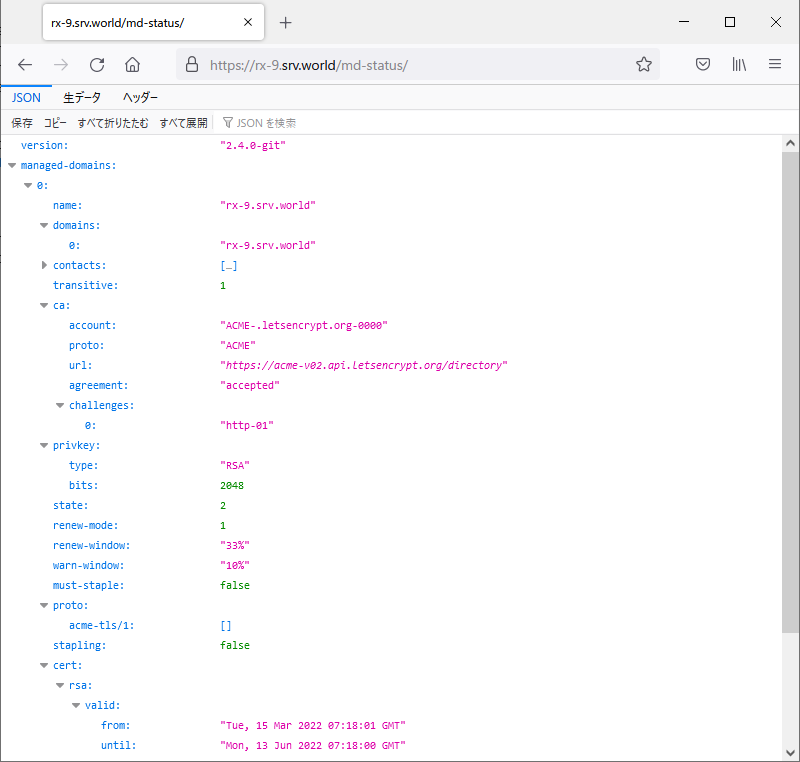
| [5] | It's possible to confirm expiration date and others of certificate with [openssl] command like follows. Or it's possible to see them to access to the URL of [md-status] you set on [2]. |
| [root@www ~]# openssl s_client -connect rx-9.srv.world:443 | openssl x509 -noout -startdate -enddate depth=2 C = US, O = Internet Security Research Group, CN = ISRG Root X1 verify return:1 depth=1 C = US, O = Let's Encrypt, CN = R3 verify return:1 depth=0 CN = rx-9.srv.world verify return:1 notBefore=Mar 15 07:18:01 2022 GMT notAfter=Jun 13 07:18:00 2022 GMT |
 |

No comments:
Post a Comment