BIND : DNS over HTTPS Client Settings : Debian |
Configure Debian Client to refer to your DNS over HTTPS Server. | |
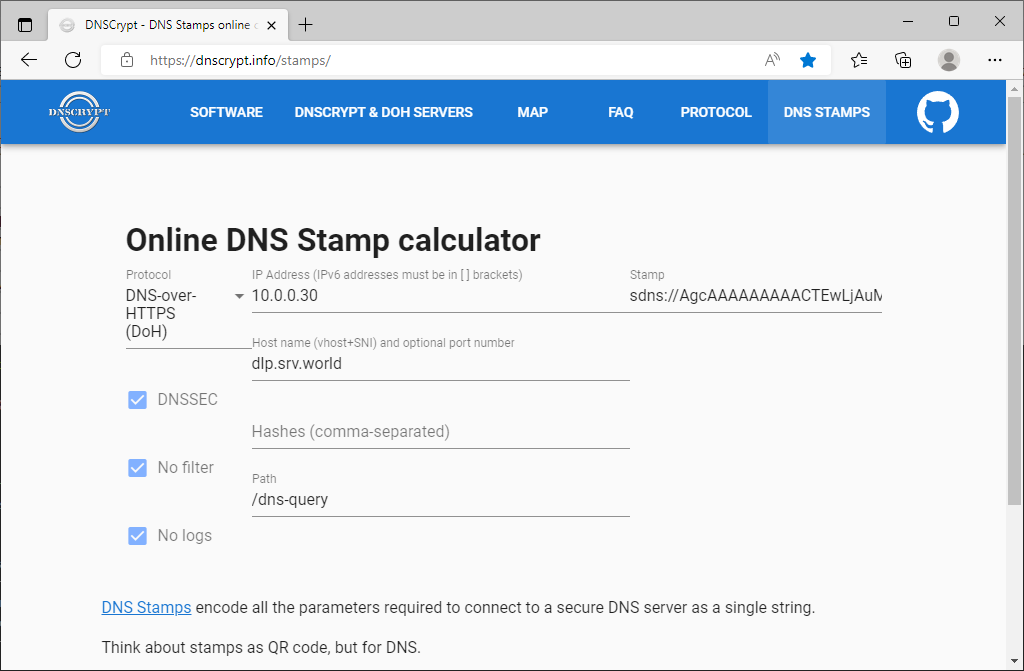
| [1] | Install dnscrypt-proxy. ⇒ https://dnscrypt.info/stamps/ Select or Input like follows. Then note the value [sdns://***] on [Stamp] section. * Protocol : DNS-over-HTTPS (DoH)* IP Address : your DNS-over-HTTPS server's IP address * Host Name : your DNS-over-HTTPS server's hostname * Path : the value for [endpoints] that you set on your DNS-over-HTTPS server settings |
 |
| [2] | Configure Debian Client to refer to your DoH server. |
root@node01:~# apt -y install dnscrypt-proxy root@node01:~# vi /etc/dnscrypt-proxy/dnscrypt-proxy.toml # Empty listen_addresses to use systemd socket activation listen_addresses = [] # change to your DoH server server_names = ['dlp.srv.world'] [query_log] file = '/var/log/dnscrypt-proxy/query.log' [nx_log] file = '/var/log/dnscrypt-proxy/nx.log' # comment out all #[sources] # [sources.'public-resolvers'] # url = 'https://download.dnscrypt.info/resolvers-list/v2/public-resolvers.md' # cache_file = '/var/cache/dnscrypt-proxy/public-resolvers.md' # minisign_key = 'RWQf6LRCGA9i53mlYecO4IzT51TGPpvWucNSCh1CBM0QTaLn73Y7GFO3' # refresh_delay = 72 # prefix = '' # add follows # set the Stamp value on [stamp] section that you made sure on [1] [static] [static.'dlp.srv.world'] stamp = 'sdns://AgcAAAAAAAAACTEwLjAuMC4zMAANZGxwLnNydi53b3JsZAovZG5zLXF1ZXJ5' root@node01:~# systemctl restart dnscrypt-proxy root@node01:~# vi /etc/resolv.conf # change to the IP address that dnscrypt-proxy listens nameserver 127.0.2.1 # * if you are using resolvconf or Networkmanager programs, # change nameserver setting on a file for their requirements # verify resolution root@node01:~# dig www.srv.world. ; <<>> DiG 9.20.11-4-Debian <<>> www.srv.world. ;; global options: +cmd ;; Got answer: ;; ->>HEADER<<- opcode: QUERY, status: NOERROR, id: 54859 ;; flags: qr aa rd ra; QUERY: 1, ANSWER: 1, AUTHORITY: 0, ADDITIONAL: 1 ;; OPT PSEUDOSECTION: ; EDNS: version: 0, flags:; udp: 1232 ;; QUESTION SECTION: ;www.srv.world. IN A ;; ANSWER SECTION: www.srv.world. 86400 IN A 10.0.0.31 ;; Query time: 0 msec ;; SERVER: 127.0.2.1#53(127.0.2.1) (UDP) ;; WHEN: Tue Aug 19 10:05:36 JST 2025 ;; MSG SIZE rcvd: 58 |
BIND : DNS over HTTPS Client Settings : Windows |
Configure Windows Client to refer to your DNS over HTTPS Server. This example is based on Windows 11. | |
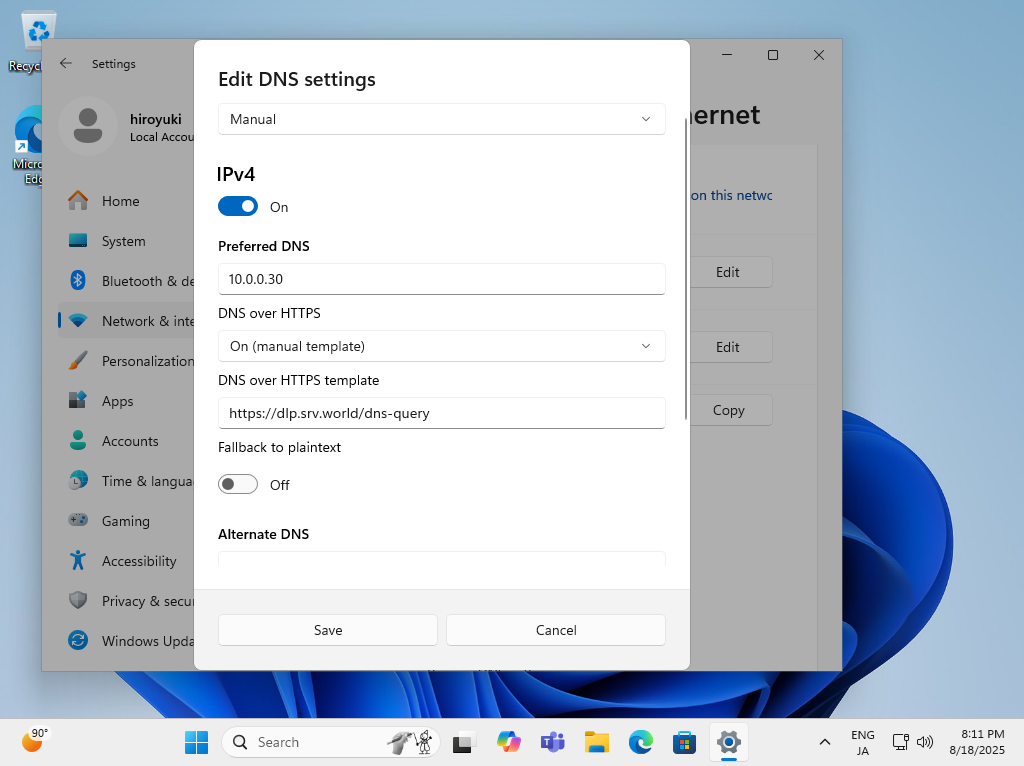
| [3] | Open the Network setting and click the [Edit] button on [DNS server assignment] section. Next, Input your DoH Server address on the [Preferred DNS] section. For [DNS over HTTPS] section, select [On (manual template)] and For [DNS over HTTPS template] section, input the value of [endpoints] in named.conf you set. |
 |
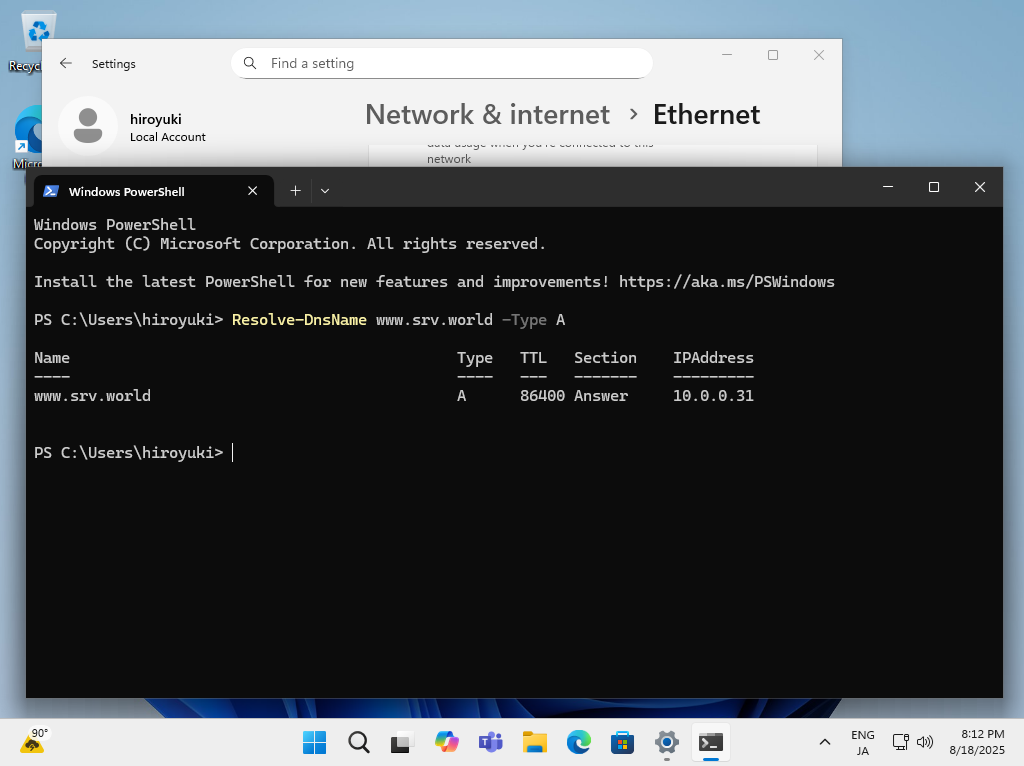
| [4] | After setting your DoH server, verify Name and Address Resolution. |
 |
Matched Content

No comments:
Post a Comment