Elastic Stack 8 : Install Metricbeat |
Install Metricbeat that collects metrics from System or Services. For Metricbeat details, refer to the official site. ⇒ https://www.elastic.co/guide/en/beats/metricbeat/current/metricbeat-modules.html | |
| [1] | Install Metricbeat. Configure Elasticsearch repository before it. |
| [root@dlp ~]# dnf -y install metricbeat |
| [2] | Configure basic settings and start Metricbeat. |
[root@dlp ~]# vi /etc/metricbeat/metricbeat.yml # line 67 : if use Kibana, uncomment and specify output host # if SSL is enabled on Kibana, hostname should be the same with the hostname in certs # [username] and [password] is the admin user's one # if using self-signed certificate, specify [ssl.verification_mode: none] setup.kibana: ..... host: "https://dlp.srv.world:5601" protocol: "https" username: "elastic" password: "password" ssl.enabled: true ssl.verification_mode: none # line 98 : specify output of Elasticsearch # [username] and [password] is the admin user's one # [ssl.certificate_authorities] is the cacert generated by Elasticsearch installation output.elasticsearch: # Array of hosts to connect to. hosts: ["https://dlp.srv.world:9200"] protocol: "https" username: "elastic" password: "password" ssl.certificate_authorities: "/etc/elasticsearch/certs/http_ca.crt" ..... ..... [root@dlp ~]# vi /etc/metricbeat/metricbeat.reference.yml # line 61 : set items to collect data # enable and disable to comment out and uncomment - module: system
metricsets:
- cpu # CPU usage
- load # CPU load averages
- memory # Memory usage
- network # Network IO
- process # Per process metrics
- process_summary # Process summary
- uptime # System Uptime
- socket_summary # Socket summary
#- core # Per CPU core usage
#- diskio # Disk IO
#- filesystem # File system usage for each mountpoint
#- fsstat # File system summary metrics
#- raid # Raid
#- socket # Sockets and connection info (linux only)
#- service # systemd service information
enabled: true
period: 10s
processes: ['.*']
# line 2677 : if use Kibana, uncomment and specify output host # if SSL is enabled on Kibana, uncomment ssl related lines # [username] and [password] is the admin user's one # if using self-signed certificate, specify [ssl.verification_mode: none] setup.kibana: # Kibana Host # Scheme and port can be left out and will be set to the default (http and 5601) # In case you specify and additional path, the scheme is required: http://localhost:5601/path # IPv6 addresses should always be defined as: https://[2001:db8::1]:5601 host: "https://dlp.srv.world:5601" # Optional protocol and basic auth credentials. protocol: "https" username: "elastic" password: "password" # Optional HTTP path #path: "" # Optional Kibana space ID. #space.id: "" # Use SSL settings for HTTPS. ssl.enabled: true ..... ..... # after very careful consideration. It is primarily intended as a temporary # diagnostic mechanism when attempting to resolve TLS errors; its use in # production environments is strongly discouraged. # The default value is full. ssl.verification_mode: none[root@dlp ~]# systemctl enable --now metricbeat |
| [3] | Verify status the data has been collected normally. |
# index list [root@dlp ~]# curl -u elastic --cacert /etc/elasticsearch/certs/http_ca.crt https://127.0.0.1:9200/_cat/indices?v Enter host password for user 'elastic' health status index uuid pri rep docs.count docs.deleted store.size pri.store.size yellow open .ds-metricbeat-8.5.3-2022.12.09-000001 M5Aeg-pHQL6llaMBUD3JuA 1 1 51 0 206.3kb 206.3kb yellow open test_index yWfKwu85RpWT_LdWnsnV9Q 1 1 1 0 6.4kb 6.4kb # document list on the index [root@dlp ~]# curl -u elastic --cacert /etc/elasticsearch/certs/http_ca.crt https://127.0.0.1:9200/.ds-metricbeat-8.5.0-2022.11.09-000001/_search?pretty Enter host password for user 'elastic'
{
"took" : 2,
"timed_out" : false,
"_shards" : {
"total" : 1,
"successful" : 1,
"skipped" : 0,
"failed" : 0
},
"hits" : {
"total" : {
"value" : 158,
"relation" : "eq"
},
"max_score" : 1.0,
"hits" : [
{
"_index" : ".ds-metricbeat-8.5.3-2022.12.09-000001",
"_id" : "tyHr9YQBSb5fRSPmqye9",
"_score" : 1.0,
"_source" : {
"@timestamp" : "2022-12-09T08:06:12.691Z",
"event" : {
"dataset" : "system.load",
"module" : "system",
"duration" : 43481
},
"ecs" : {
"version" : "8.0.0"
},
.....
.....
|
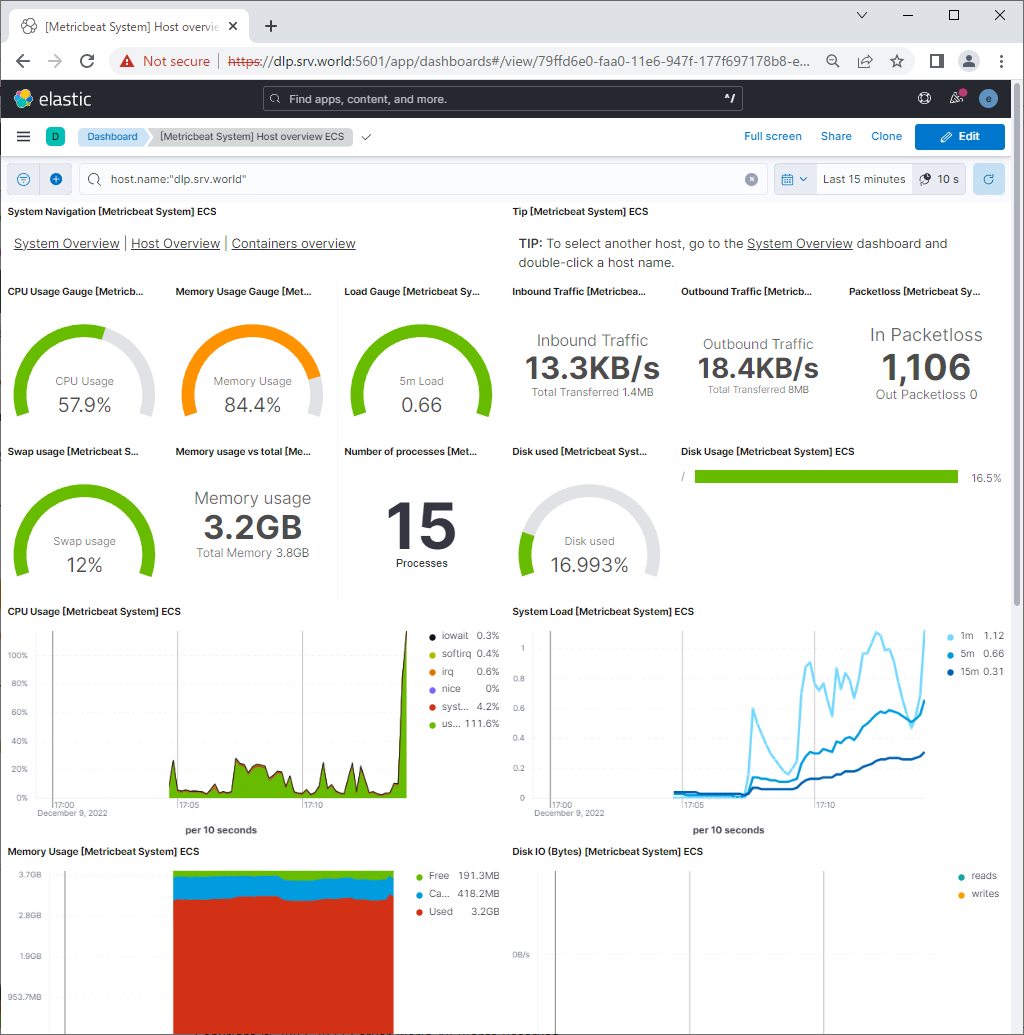
| [4] | If Kibana is running, it's possible to import data to sample Dashboards. |
| [root@dlp ~]# metricbeat setup --dashboards Loading dashboards (Kibana must be running and reachable) Loaded dashboards |
 |

No comments:
Post a Comment